

What is HubSpot? CRM, marketing & sales platform guide
New to HubSpot? Learn what it is, how it helps manage marketing, sales, and CRM in one place—and why it’s a go-to tool for growing businesses.
Launch marketing campaigns faster, hand off deals more smoothly, and retain more customers with a single go-to-market (GTM) software platform. HubSpot connects marketing, sales, and service teams—so everyone executes from a shared source of truth.
In this guide, you’ll learn what HubSpot is, how it works, and why it’s a popular software choice for growing businesses. You’ll discover what sets HubSpot apart from competitors, from its unified data to its extensive app ecosystem.
Since features only matter if you can actually put them into practice, you’ll also learn how marketing teams use HubSpot to get work done. So you can decide if this software platform is right for your team.
What is HubSpot?
HubSpot is a CRM with six integrated Hubs that bring together marketing, sales, customer service, and content management together on a single cloud-based platform. You can manage your entire customer lifecycle with HubSpot, from first touch to long-term advocacy.
HubSpot is ideal for SMB to mid-market teams that want an all-in-one platform with AI-powered automation and no-code tools. Enterprise businesses use HubSpot to create a single source of truth for customer data, enforce governance, and automate complex operations at scale.
HubSpot’s key differentiators
This all-in-one platform is known for:
- Ease of use: Known for its intuitive interface and accelerated onboarding, HubSpot holds a G2 rating of 4.4 out of 5 stars. Reviewers consistently praise its modern UI, logical navigation, and low learning curve.
- Native integrations: HubSpot has six Hubs that integrate with its CRM. It also has numerous integrations with third-party communication, marketing, and automation tools.
- Automation: HubSpot offers no-code workflows across all its hubs, so teams can automate tasks like follow-ups, ticket routing, and data cleanup. With automation built into the CRM, processes stay connected and handoffs happen smoothly.
How HubSpot evolved from inbound tool to complete GTM suite
Founded in 2006, HubSpot initially launched as an inbound marketing tool. It featured tools for blogging, SEO, lead capture, and performance analytics—allowing marketers to generate leads without cold calls or intrusive ads.
By 2015, HubSpot launched its free CRM, which became the backbone of its all-in-one platform. Today, HubSpot is a complete GTM platform that connects the entire customer lifecycle using AI and automation.
What are the 6 HubSpot Hubs?
HubSpot’s six modular Hubs each handle a specific function. While each one works independently, all connect to HubSpot’s CRM and share contact data.
HubSpot’s 6 Hubs
| Hub | Core focus | Key features |
| Marketing | Attracting and converting prospects | Blogging, SEO recommendations, email automation, PPC management, and a social media AI agent |
| Sales | Managing deals and pipeline | AI-powered prospecting, conversation tracking, email templates, sales automation, and forecasting |
| Service | Supporting and retaining customers | Ticketing, live chat, knowledge base, service-level agreement (SLA) management, AI support bots |
| Content | Managing website, blog, and gated content | Drag-and-drop website builder, SEO recommendations, case study generator, membership subscriptions |
| Operations | Syncing and cleaning data and automating workflows | Automated workflows, data collection and sharing, and custom report builder |
| Commerce | Invoicing, billing, and processing payments | Quotes, invoices, subscription billing, and revenue reports |
1. HubSpot Marketing Hub
Marketing Hub is HubSpot’s marketing automation product. It helps you coordinate campaigns across email, social media, paid ads, content, SEO, video, and SMS. As a result, every channel maintains aligned messaging and works toward the same goals.
Marketing Hub helps you attract visitors, turn them into qualified leads, and automatically nurture them along their customer journey. Plus, its AI-assisted content creation and optimization tools help teams publish high-quality content across channels.
HubSpot has been named a Leader in the Gartner Magic Quadrant for B2B Marketing Automation Platforms. Which indicates that it’s a top choice for marketers looking to drive growth.

Source: HubSpot
Marketing Hub offers these capabilities:
- Email marketing: Send targeted campaigns to specific audience segments. Personalize messages with CRM data and content. Then, automate follow-ups based on user actions.
- Landing pages with forms: Create branded landing pages with forms to capture visitor information. Use that data to take automated actions like sending a welcome email or routing the lead to sales.
- SEO recommendations: Get tips to improve your on-page SEO in the content editor while you write website content
- Social media management: Schedule and publish content across social media networks. Then, track your performance and report on ROI.
- Ad management and retargeting: Create and manage ads across search engines and social media. Retarget contacts using CRM data and tracked website activity.
- Lead generation: Attract and convert new prospects through campaigns across your website, social media, and ads. Automatically add qualified leads to the CRM for nurturing and sales follow-up.
- Nurture campaigns: Use automated email and ad sequences to guide prospects toward a purchase. Deliver relevant content based on their behavior, interests, and stage in the buying process.
- Campaign reporting and analytics: Track the performance of all your marketing activities with one dashboard. Measure results by channel, campaign, or audience to see what’s working—and identify areas for improvement.
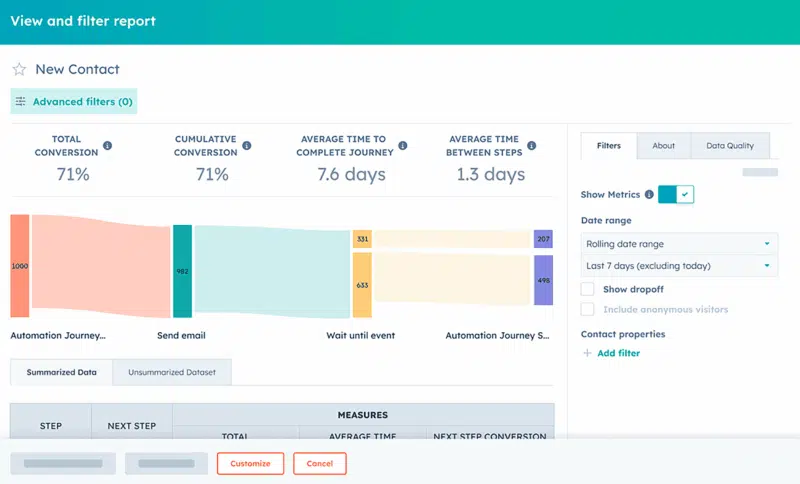
Source: HubSpot
Marketers can use these capabilities to:
- Build full-funnel campaigns. Create a sequence where a user downloads an ebook from a landing page, receives a five-part email nurture series, and is then added to a retargeting audience for LinkedIn ads.
- Implement account-based marketing (ABM). Use HubSpot’s ABM tools to identify target accounts. Then, personalize website content for visitors from those accounts and report on account-level engagement.
2. HubSpot Sales Hub
Sales Hub tracks, streamlines, and automates the sales process. Which helps sales teams manage pipeline and close deals more efficiently.

Source: HubSpot
Sales Hub includes the following capabilities:
- Lead scoring: HubSpot’s AI-powered lead scoring helps reps focus on the prospects most likely to convert, shortening sales cycles
- Lead management and prospecting: Handle prospecting and lead generation with one dashboard, using AI to determine who to contact, suggest next steps, and draft outreach
- Deal and pipeline management: At a glance, see where prospects are in the sales process. Easily prioritize opportunities and automate follow-up reminders to keep deals moving.
- Email tracking and templates: Send outreach using prebuilt templates. See when contacts open emails or click tracked links, and set up drip sequences to automate follow-ups.
- Meeting scheduling: Book calls with a shareable link that connects to your calendar and logs meetings in your CRM. Rely on HubSpot’s AI meeting assistant to handle prep and follow-up
- Sales analytics and forecasting: Get real-time reports on team performance, deal progress, and revenue forecasts. See which deals need attention so you know whether you’re on track to hit your team’s goals.
- Calling and call transcription: Place calls directly from HubSpot and record conversations (with permission). Then, get transcripts to use for coaching and follow-up.
- Sales content management: Store approved sales materials like case studies, one-pagers, and proposals. Make content easier for sales teams to find so they can reference it on calls.
Marketing and Sales teams can use these capabilities to:
- Align Sales and Marketing. Create automated workflows that instantly notify a sales rep via Slack when a marketing-qualified lead (MQL) takes a high-intent action—like requesting a demo.
- Standardize sales plays. Build a library of email templates, call scripts, and sales playbooks to ensure consistent messaging and faster onboarding for new sales reps.
3. HubSpot Service Hub
Service Hub helps customer success teams deliver excellent customer support and improve retention with help desk and ticketing tools, live chat, a self-service knowledge base, and feedback surveys. It also offers AI support agents that scale service.
Service Hub has the following capabilities:
- Ticketing and help desk automation: Manage all customer support requests in a shared inbox. Automatically assign tickets to agents based on topic or priority.
- Live chat and bots: Use AI-powered chatbots to deliver fast, personalized support 24/7. Complex issues route to live agents automatically, and every conversation is logged in the CRM.
- Knowledge base and customer portal: Create a searchable library of content so customers can resolve issues on their own. Provide an online portal where they can track ticket status and review past conversations anytime.
- Customer feedback surveys: Collect feedback directly from customers. Set up automated surveys to measure net promoter score (NPS) and customer satisfaction (CSAT).
- Service-level agreement (SLA) tracking and escalation: Define response time goals for your support team. Automatically escalate tickets when those timelines aren’t met.
- Customer support reporting and analytics: Monitor metrics like ticket volume, response times, and satisfaction scores. Identify performance issues to address and track improvements over time.

Source: HubSpot
Customer Success teams can use these capabilities to:
- Create a proactive support system. Use chatbots to answer common customer questions on your website. Automatically create support tickets for complex issues, routing them to the correct team based on the inquiry type.
- Measure customer health. Track key service metrics and feedback to identify at-risk customers. Then, trigger automated check-in emails to improve retention.
Recommended Articles

Your Attribution Model is Missing 40% of Brand Discovery
✓ Track brand mentions across all AI search platforms in real-time
✓ Connect AI-driven discovery to your existing analytics
✓ Measure sentiment and accuracy of every AI mention
Enterprise-grade AI tracking. Finally.
4. HubSpot Content Hub
Content Hub is HubSpot’s content management system (CMS). It lets you build and manage a website, a blog, and other content assets.
It can optimize content for all audiences and create personalized content for specific segments. This Hub also offers robust content planning tools, automated workflows, and in-depth analytics to help marketers scale content programs efficiently.
Content Hub features the following capabilities:
- Drag-and-drop page builder: Build and publish websites, blogs, and landing pages using no-code themes and modules
- AI-powered content creation: Scale content production with HubSpot’s AI tools, including content and copy generators
- SEO tools and recommendations: Get real-time suggestions for keywords, titles, internal links, and metadata to improve search visibility as you write
- Content staging and approvals: Stage website changes in a secure environment, preview them before launch, and enforce approval workflows to maintain quality control
- Memberships and gated content: Build a library of exclusive gated resources to attract and capture leads
- Brand management: Ensure a consistent brand identity across all website assets with reusable templates, style settings, and design elements. Use Brand Voice to apply your voice, tone, and style to every piece of content.
- Personalization: Deliver tailored experiences using CRM data. Dynamically adjust website headlines, CTAs, and content blocks based on visitor attributes like industry, role, or lifecycle stage.
- Content remixing: Repurpose long-form website content into social updates, newsletters, or audio.
- Campaign planning and coordination: Plan, schedule, and manage content across channels with shared editorial calendars, assigned tasks, and campaign workflows.
- Campaign analytics and reporting: Measure content performance by format, channel, or campaign. Build custom reports and use the data to refine your strategy.

Source: HubSpot
You can use these capabilities to:
- Increase engagement: Personalize website headlines and CTAs for each visitor to boost clicks and conversions
- Grow your database: Offer gated or member-only resources to capture prospect details and build richer customer profiles
- Publish faster and stay on-brand: Use AI to repurpose content across channels and keep your brand voice consistent
5. HubSpot Operations Hub
Operations Hub is HubSpot’s operations management software. It includes tools for data syncing, workflow automation, and data quality. It syncs data between HubSpot Hubs and third-party apps in real time, cleans customer records, and automates business processes—for more efficient operations.
Tip: Spending countless hours moving data between tools and fixing broken automations? Use HubSpot Operations Hub to automatically clean data and keep workflows in sync.

Source: HubSpot
Operations Hub has the following capabilities:
- Data sync and integration: Connect HubSpot with over 1,900 apps and sync updates in real time—so customer records stay current and consistent across tools
- Custom automations: Build custom workflows with JavaScript or Python when standard automations don’t cover your needs
- Data quality automation and deduplication: Automatically clean data by fixing formatting, standardizing fields, and merging duplicate records
- Custom properties and field mapping: Create fields specific to your business and control how they map between HubSpot and other systems
- Workflow extensions and webhooks: Trigger actions in external tools—like sending a Slack alert or updating a Google Sheet
- Process automation: Automate routine tasks like routing leads, updating deal stages, or sending notifications to save time and reduce errors
- Datasets and reporting: Build reusable datasets that make reporting faster, more accurate, and easier to share
Operations professionals can use these capabilities to:
- Give every team the same customer view. Sync HubSpot with tools like Salesforce, product analytics platforms, or finance systems. With two-way, real-time sync, customer records stay consistent and everyone works from the same information.
- Maintain a clean database. Automate data cleanup by formatting company names consistently, capitalizing job titles, and merging duplicates. Make reports more accurate and personalized campaigns more effective.
6. HubSpot Commerce Hub
Commerce Hub can help you manage and grow subscription sales while connecting billing and revenue data to the CRM. It offers tools for payment processing, quotes and invoices, and subscription billing.
Capabilities:
- Payment processing: Accept payments directly in HubSpot using HubSpot Payments or by integrating with tools like Stripe
- Quotes and invoices: Create branded quotes and invoices, and then track their status within the CRM
- Subscription and billing management: Automate recurring billing and manage customer subscriptions with the same dashboard
- Product and order management: Set up a product library and create orders that automatically link to customer records
- Checkout and payment links: Provide customers with easy checkout pages or send them payment links
- Revenue reporting: Track payments, deals, and customer lifetime value (CLV) in custom dashboards
- AI-driven purchase insights: Get actionable recommendations from predictive analytics and automated suggestions to personalize upsell and cross-sell offers
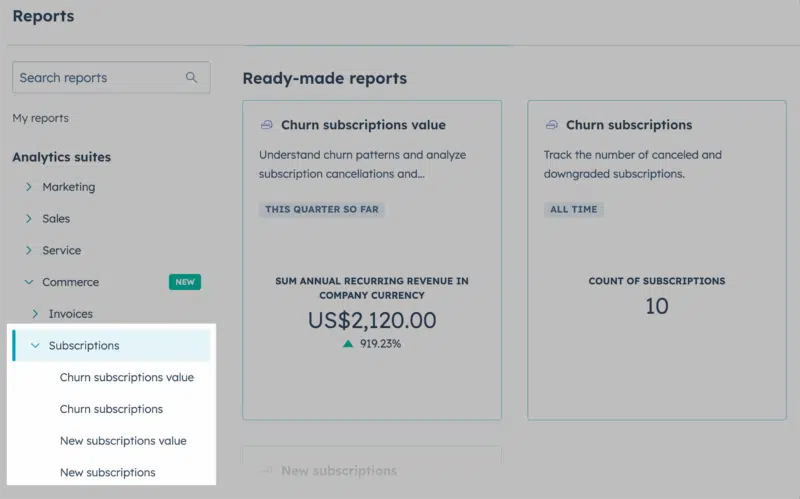
Source: HubSpot
Marketers can use these capabilities to:
- Unify revenue data. Integrate payment and subscription data directly into contact records. Segment by CLV or purchase history to personalize offers, trigger renewals, and drive upsells.
- Automate renewals and upsells. Create workflows that trigger renewal reminders or targeted upsell offers to existing customers based on their subscription status and product usage.
How the HubSpot CRM connects every Hub
HubSpot’s CRM connects each Hub and data point. This ensures everyone on your GTM team works from the same data—allowing for more personalized and timely interactions.
Unified contact records
In HubSpot, a contact is any individual in your database—whether they’re a lead, prospect, or customer. Each record stores contact details and logs every interaction, including emails, calls, meetings, notes, and support tickets. This gives teams a single source of truth for managing relationships.
For example, before a call, a sales rep can see the emails a contact opened, the pages they visited, events they attended, and any open service tickets. With that context, it’s easier to personalize conversations and hand off smoothly between marketing, sales, and service.
No-code and low-code automation
Because all customer data lives in the CRM, HubSpot users can build powerful, cross-functional workflows without writing a line of code. A visual drag-and-drop editor makes it easy to create rules that automate repetitive tasks.
Say a new lead downloads an ebook from your website. HubSpot captures their email address and automatically enrolls them in a five-part email nurture sequence.
After attending a live product demo and requesting more information, a workflow automation creates a task for a sales rep to follow up. HubSpot notifies the rep via Slack.
Timeline of activity across marketing, sales, and support
Every HubSpot record includes a timeline that logs activities in chronological order—emails, calls, meetings, notes, and tasks. The timeline updates automatically and can be filtered by activity type so you can see what influences pipeline.
Because the timeline captures every touchpoint in one place, teams no longer need to piece together data from siloed tools. Marketing, Sales, and Service all work from the same activity log. That shared view makes handoffs smoother and helps teams understand what moves deals forward.
Built-in AI tools
Breeze AI is HubSpot’s collection of generative and predictive AI tools. It’s built into each Hub, allowing teams to personalize experiences, automate workflows, and uncover insights at every stage of the GTM and customer journeys.
Breeze AI includes:
- AI content assistant in Marketing and Content Hubs to draft, repurpose, and optimize copy
- Predictive lead scoring in Sales Hub to surface the most promising opportunities
- Automated ticket tagging and routing in Service Hub for faster customer support
Who is HubSpot for?
HubSpot is designed for businesses that need to connect their marketing, sales, and customer service functions. Ideal users typically fit into the following categories.
Company size and growth stage
HubSpot adapts to organizations at every growth stage, from early startups to global enterprises. Here’s how it scales with them as their needs become more complex:
- Small and medium-sized businesses (SMBs) often find HubSpot ideal for scaling their GTM operations. Many begin with the free CRM and starter Marketing Hub—and then expand into paid Hubs as their needs grow.
- Mid-market companies use HubSpot to align sales and marketing processes. Shared data and workflows make lead handoffs smoother and help teams prioritize qualified leads that are most likely to close.
- Enterprise organizations rely on HubSpot’s governance features (single sign-on (SSO), sandboxes, and audit logs) and scalable architecture. This helps them manage multiple global brands, enforce data access controls, and navigate compliance requirements across regions.
Target industries
HubSpot is best suited for industries where digital engagement and operational efficiency are critical. Companies in these industries often find HubSpot particularly valuable:
- SaaS and technology: HubSpot’s integrated CRM and marketing automation simplify recurring revenue, reduce customer churn, and streamline customer onboarding
- B2B services and agencies: HubSpot’s centralized CRM, marketing automation, and sales tools help services firms scale client acquisition
- Education and nonprofits: HubSpot brings affordable automation and data consolidation to lean budget-strapped teams
- Ecommerce: With native commerce features and integrations like Shopify and WooCommerce, HubSpot supports behavioral segmentation, abandoned cart workflows, and revenue reporting
Team mindset
HubSpot tends to resonate with growth-focused teams that want to scale efficiently without adding unnecessary complexity. These teams often prioritize:
- Unified data that eliminates silos so teams can work from a single source of truth
- Inbound methodology that attracts customers through valuable content rather than outbound interruption
- Ease of use and a user-friendly interface that allows for quick onboarding and reduces reliance on IT
- No-code automation that empowers marketing, sales, and customer service teams to build their automated workflows
What makes HubSpot unique?
HubSpot is a best-in-class CRM and a growth engine for GTM teams. From methodology to training to tools, HubSpot is built to help teams move faster, demonstrate ROI sooner, and build a foundation for long-term growth.

Here’s what sets HubSpot apart:
Native integration across Marketing, Sales, and Service
Each Hub operates independently yet stays connected via HubSpot’s CRM. This means contact records update automatically. Marketing can see which emails were opened, Sales knows which pages were visited, and Support has full context on open tickets.
Fast time to value and ease of use
HubSpot is known for its intuitive user interface (UI) and quick setup, especially compared to traditional CRMs that require heavy IT lift. This means organizations can implement HubSpot quickly and accelerate time to value.
Built-in training and certification ecosystem
HubSpot Academy offers hundreds of free, self-paced courses and certifications designed to help users master the software platform. From inbound marketing to RevOps, these courses can build your team’s skills while accelerating platform adoption.
Vast partner network
HubSpot’s partner network supports both service and technology partners.
The Solutions Partner Program connects you with 1,500+ certified agencies for onboarding, strategy, and custom projects. Which means your team gets expert help without adding headcount.
The App Partner Program attracts developers who build tools available in HubSpot’s App Marketplace. Which lets you connect HubSpot with the tools your business already uses and expand the platform without rebuilding your tech stack.
Transparent, modular pricing with a freemium entry point
HubSpot’s free forever CRM lets organizations start small. As your business grows, you can expand into paid tiers (Starter, Professional, or Enterprise), adding only the Hubs your team needs.
Inbound, content-first DNA
As the pioneer of inbound marketing, HubSpot was designed to help marketers attract customers with helpful content. That content-first approach still runs through both the community and the platform today.
HubSpot Academy and the INBOUND conference teach the inbound methodology, while the platform’s SEO and content tools help brands increase visibility in search and build trust with prospects.
Common HubSpot use cases
Now that you know how HubSpot works, you might be wondering what that means for your workflows. Here are some ways marketing teams often use HubSpot to get work done.

Run multi-channel lead generation campaigns
With HubSpot, you can manage marketing campaigns that include email, ads, social media, and your website. Instead of juggling disconnected tools, you coordinate across channels with a shared calendar, content, templates, and workflows. This means you can keep messaging consistent and campaigns on track.
Build SEO-optimized content and landing pages
With Content Hub, you can publish blogs, landing pages, and gated assets. Because it uses a drag-and-drop interface, it doesn’t require developers or IT investments.
As you write, the built-in editor provides SEO recommendations like titles, metadata, internal links, and readability tips. This optimizes your content before you hit publish—which can help you attract more qualified search traffic over time.
Automate email nurture workflows
Set up workflows that automatically enroll contacts into nurture sequences based on their behavior, such as registering for a webinar or downloading a guide. HubSpot handles the follow-up with emails tailored to their interests. It even routes qualified leads to sales when they’re ready to buy.
Sync contacts and deals with Salesforce or other CRMs
Many B2B companies use HubSpot alongside Salesforce or another CRM. For example: HubSpot for creating content and automating campaigns and Salesforce for managing complex pipelines and revenue tracking.
These native CRM integrations ensure that contacts, leads, and deals stay in sync—with no manual exports or data cleanup required.
Create service pipelines with SLAs
Strong lead generation and conversion campaigns only get you so far. Customer retention and referrals depend on a good experience after the sale.
With Service Hub, you can build support ticket pipelines to manage support requests and use SLA-based workflows to automatically escalate tickets if they aren’t resolved on time. This way, your marketing results aren’t undermined by poor service after the sale.
Report on full-funnel performance in a single dashboard
Instead of piecing together reports from multiple tools, HubSpot lets you connect Marketing, Sales, and Service data in one place. You can create reports to track how contacts or deals progress through lifecycle or deal stages.
From there, it’s easy to add reports to custom dashboards alongside campaign, pipeline, and service metrics. The result? A full-funnel view that helps you spot bottlenecks, understand conversion rates, and tie marketing activity to revenue outcomes.
HubSpot’s app and integration ecosystem
The HubSpot ecosystem includes an app marketplace, native integrations, and custom integrations. From CRMs and ecommerce platforms to analytics tools and AI assistants, this ecosystem lets you build the GTM system you need.
HubSpot App Marketplace
The HubSpot App Marketplace features over 1,900 third-party apps that connect directly to HubSpot. Every listing is vetted by HubSpot for functionality and security.
These apps cover everything from ecommerce and event management to analytics, finance, and customer support—which makes it easy for teams to find specialized solutions without sacrificing data integrity.
Key integrations
One of HubSpot’s biggest strengths is its native integrations. By integrating the marketing, sales, and customer service tools you already use, you can create your own custom GTM solution.
HubSpot provides robust native integrations with platforms like:
Communications & Productivity
Log every customer email in HubSpot automatically with Gmail or Outlook. Get real-time lead and deal alerts in Slack or Microsoft Teams. Sync meetings with contact records through Zoom or Google Calendar.
Sales & CRM
Keep contacts and deal stages aligned with Salesforce or Pipedrive. Pull prospect insights straight into HubSpot with LinkedIn Sales Navigator. Send and track contracts directly in the CRM with PandaDoc or DocuSign.
Ecommerce & Payments
Sync order and cart data from Shopify or WooCommerce. Push payments and invoices from Stripe, PayPal, or QuickBooks into customer records. Use that data to segment by purchase history, trigger renewal campaigns, and track CLV.
CMS & Web
Connect sites built on WordPress, Wix, Squarespace, or Webflow. Capture form submissions and visitor activity in HubSpot contacts. Track conversions and personalize campaigns.
Marketing & Ads
Sync Google Ads, Facebook Ads, and LinkedIn Ads with HubSpot to build audiences from CRM lists and track which campaigns drive pipeline. Import registrations from Eventbrite. Align email lists with Mailchimp so campaigns stay consistent across platforms.
Customer Support & Service
Log tickets and conversations from Zendesk, Intercom, or Freshdesk to HubSpot contacts. Push survey responses from SurveyMonkey or Typeform into the CRM. Use feedback to follow up with customers and improve retention.
Custom integrations with APIs and webhooks
For many teams, HubSpot’s marketplace apps and native integrations cover most needs. But what if you use a niche tool—or proprietary software? That’s where HubSpot’s APIs and webhook support come in.
- APIs: Pull data from tools that don’t have a native integration, such as proprietary SaaS apps, custom event systems, billing tools, or internal databases. For example: Import event attendance data from your custom event platform into HubSpot and automatically launch a thank-you campaign that shares session recordings with attendees. This keeps the conversation going after your event and helps your team identify and qualify the leads who stay engaged.
- Webhooks: Send real-time updates to external systems when key events happen in the CRM—such as when a deal closes, a lead becomes sales-qualified, or a form is submitted. B2B teams often use them to connect HubSpot with proprietary billing platforms, internal dashboards, or custom onboarding tools. For example: When a deal is marked closed-won in HubSpot, a webhook can push that data straight to your billing system to generate and send an invoice.
For marketing leaders, this may mean you don’t have to worry about outgrowing HubSpot. As your tech stack evolves, HubSpot can flex with you—whether that’s syncing with a custom event platform, pulling in product usage data, or building a unique reporting workflow.
HubSpot vs. Salesforce, Marketo, and Zoho
HubSpot is a powerful all-in-one GTM platform. But it’s not the right fit for every business. Whether it’s right for you depends on the complexity of your processes, the level of customization you need, and your budget.
Here’s how HubSpot compares to some common alternatives:
| Platform | Best fit (ICP) | Key benefits |
| HubSpot | SMBs, mid-market, and growing enterprise teams seeking a unified CRM and GTM platform | All-in-one solution, fast time-to-value, intuitive UI, native integrations with major tools, and support for 1,900+ third-party apps |
| Salesforce | Large enterprises with complex sales processes requiring deep customization | Highly customizable, vast AppExchange ecosystem, advanced reporting, automation |
| Marketo Engage (Adobe) | Enterprise marketing teams with a separate CRM | Deep marketing automation features, advanced lead nurturing, robust analytics |
| Zoho | Businesses needing a broad, affordable suite covering GTM and back-office functions | Wide range of apps beyond GTM (including finance and HR tools), competitive pricing, flexible configurations |
Now let’s take a closer look at how HubSpot stacks up against each of these platforms.
HubSpot vs. Salesforce
HubSpot is an all-in-one GTM suite with a user-friendly core that marketers can put to work immediately.
Salesforce is similarly powerful but tends to require extensive customization. Before it can run at full capacity, it typically requires developers and other specialists to configure and maintain, along with more extensive onboarding.
Deciding between the two depends on what you value most:
- Best for ease of use: HubSpot is generally a better choice for teams that prioritize ease of use and quick time-to-value. Its interface is more intuitive out of the box.
- Best for deep customization: Salesforce is a popular choice for large enterprises with complex sales processes that require deep, custom development and a vast ecosystem of specialized AppExchange apps
HubSpot vs. Marketo Engage (Adobe)
Choosing between HubSpot and Marketo often comes down to scope. HubSpot is a CRM that covers the full customer lifecycle with tools for marketing, sales, service, content, operations, and commerce.
Marketo Engage focuses more narrowly on marketing automation, with strengths in email campaigns, complex lead nurturing, and multi-touch attribution reporting—and it requires a separate CRM to manage customer records.
So, which companies tend to benefit most from each platform?
- Best for mid-market: HubSpot is often a better fit for mid-market companies that need a single platform to manage their entire customer lifecycle
- Best for enterprise marketing teams: Marketo is often favored by large enterprise marketing teams that have a separate, robust CRM and require advanced marketing automation capabilities
HubSpot vs. Zoho
Both HubSpot and Zoho offer a broad suite of business apps, but they take very different approaches.
HubSpot is built around a central CRM, with Marketing, Sales, and Service tightly integrated into one system. From there, you can extend its capabilities with thousands of third-party tools through the App Marketplace and HubSpot’s native integrations.
Zoho, on the other hand, builds every element in-house. It offers over 50 apps that span everything from CRM to HR to finance. This lets teams manage multiple business functions from one platform.
The catch? Because many apps were developed independently, syncing data and workflows often requires extra configuration to ensure they work together.
Here’s how their strengths align with actual business use cases:
- Best for GTM alignment: HubSpot’s strength lies in its seamless alignment between the Marketing, Sales, and Service Hubs
- Best for broad business operations: Zoho a popular choice for businesses looking for a complete suite that covers not just GTM functions but also finance, HR, and other business operations
HubSpot is a powerful GTM platform
From startups looking to implement their first CRM to enterprise companies seeking to consolidate a growing martech stack, HubSpot’s scalability and comprehensive feature set make it a clear choice for organizations of all sizes.
Learn how to plan a successful HubSpot implementation and improve CRM adoption rates with these resources:
New on MarTech