

Transactional, triggered, and promotional emails: What’s the difference?
These three email types may look similar, but they serve different purposes, follow different rules, and drive revenue in different ways.
Spy on Any Website
Transactional, triggered, and promotional emails may all land in the same inbox, but they don’t do the same job. They follow different rules, support different business goals, and create value in different ways.
Those distinctions matter more than they might seem. They influence everything from compliance and deliverability to customer experience and revenue. Treating every email the same can lead to missed opportunities, unnecessary risk, or both.
Over the past decade, I’ve found it helpful to think about email in three categories: transactional, triggered, and promotional. The lines aren’t always clear-cut, but this framework makes it easier to decide what an email is supposed to do, how it should behave, and what success looks like.
How I classify email types
Transactional
You can’t move forward without this email. It closes the loop on something the user just did.
Examples: Password reset, order confirmation, subscription renewal.
Oscar Health Insurance: Sent after registration. Requests the information needed to complete insurance enrollment.

MarTech: Confirms conference registration and secures the attendee’s spot.

Kiwi.com: Confirms a flight booking and provides full itinerary details.

Triggered (Behavioral)
Initiated by the user’s action and sent at an individual time for each person.
- Examples: Cart abandonment, birthday email, a guide someone requested, platform adoption emails like “you created X videos this week.” Worth keeping in mind: “Not all triggered messages are transactional, but all transactional messages are triggered.” — Len Shneyder, “Unlocking the full potential of transactional emails”
Grammarly: Triggered by account activity or inactivity over the past week. Provides a summary of user engagement and writing activity.

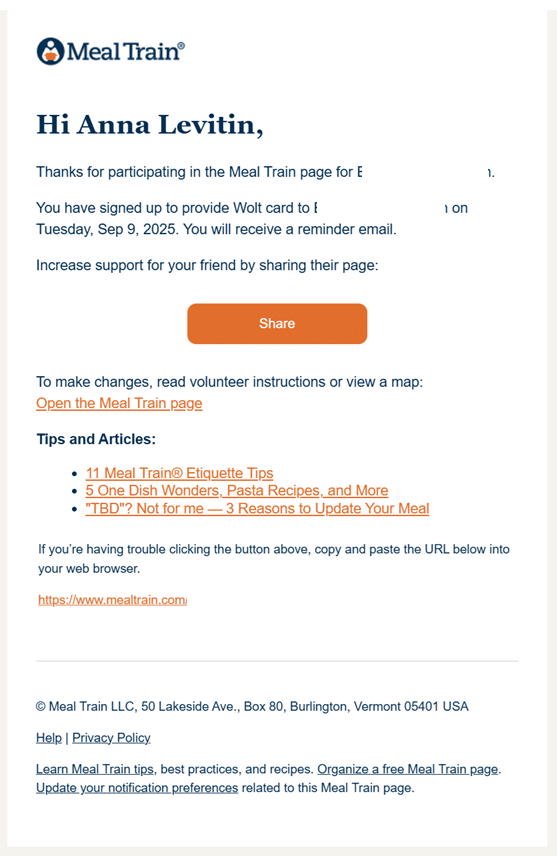
Meal Train: Triggered after someone joins a Meal Train for a friend’s family. Confirms participation.
Stripo: Triggered by a plan upgrade. Explains the new plan features and highlights what unlocked after moving from the previous plan.

Promotional (Commercial)
Anything the company wants to communicate. Yes, important product updates count as promotional emails, too.
- Examples: A sale, a new podcast episode, a letter from the founder, research results.
Corkcicle: Promotes a weekend essentials set.

Zillow: Shares educational, value-focused content about home loans and current interest rates.

Terrain: Promotes home and garden essentials and highlights ongoing sales and offers.

Side note: Both the MarTech and Meal Train emails confirm participation, but they function differently.
I classified MarTech’s email as transactional because it confirms registration and provides the access link needed to join the event.
I classified Meal Train’s email as triggered because participation is already confirmed on the website, and the email mainly serves as a follow-up with additional context and information.
The world’s most powerful SEO platform, purpose-built for Enterprise.
What each email is supposed to do
Knowing what each email type is helps, but it’s just as important to know what job each one does.
- Transactional: Fulfill a user request and provide critical information. Not to sell.
- Triggered: Maintain the relationship and nurture engagement based on the user’s actions.
- Promotional: Stimulate interest and generate revenue.
Keeping these jobs separate makes it much easier to write better emails and avoid mixing the wrong things together.
Recommended Articles
Unsubscribe rules
Respecting someone’s inbox means respecting their right to leave it.
Transactional
Users can’t unsubscribe from transactional emails. That’s by design. The email ties to something they did or a service they use. Add a short explanation in the footer so users don’t feel trapped.
Something like:
- “You’re receiving this email in connection with your account or a recent request. Because it’s necessary to provide our service and isn’t promotional, it’s sent regardless of your marketing email preferences and doesn’t include an unsubscribe link.”
A real example from Patreon:
- “You have received this mandatory email service announcement to update you about important changes to Patreon’s Terms of Use and Privacy Policy.”
Promotional
Users should be able to unsubscribe easily and manage their preferences so that they can opt out of specific types of emails, such as product updates, discounts, or event emails, not just everything or nothing.
Senders must include one-click unsubscribe functionality in the body of all outgoing promotional emails. This is a requirement, not a nice-to-have.
Triggered
The same rules apply to promotional emails. Users should be able to unsubscribe easily.
A good rule of thumb: If the user didn’t ask for it and it isn’t tied to a specific action, they should be able to opt out.
Which email types make the most money?
Email isn’t just a communication tool. Depending on the type, it can be a serious revenue driver.
Transactional
Open rates for transactional emails are two to three times higher than those for promotional emails, per MailerToGo’s 2025 benchmark report. That means transactional emails aren’t just compliance obligations. You already have the user’s attention.
This is the most-read email you’ll ever send. That makes order confirmations and shipping notifications a real opportunity for cross-sells and upsells. More on that below.
Triggered
Triggered emails generate the strongest revenue per send. Klaviyo’s 2026 data shows flows generate around 41% of total email revenue from just 5.3% of sends, earning about 18 times more revenue per recipient than promotional emails.
Promotional
Promotional emails drive the highest volume, but the lowest efficiency per send. Overall email channel ROI is often cited as $36 for every $1 spent, but automation lifts much of that return. Promotional is where most people start, but it’s the least efficient of the three per recipient.
If I had to prioritize, I’d set up transactional emails first, build triggered flows second, and scale promotional third. The ROI follows that order.
The gray areas
Is the welcome email transactional or promotional?
There’s a lot of debate about this one. My take: The first welcome email, especially if it includes an account activation step, sits in a gray area. But it should still include an unsubscribe option because the user signed up for communication, not a locked-in relationship.
Is it OK to add a promotional banner to a transactional email?
We’ve just learned that transactional emails get a higher open rate, so the temptation is real. The CAN-SPAM Act addresses this through the concept of primary purpose.
When an email contains both transactional and promotional content, the message’s primary purpose determines how it’s treated. Every brand has to decide how it feels about that.
Where email programs break down
Using several email platforms without syncing them
Many companies use one platform for transactional email and another for promotional email. That’s common, and sometimes it makes sense. But if the platforms don’t talk to each other, you lose visibility into the full picture of what a user receives.
For smaller companies, that might look like company updates sent via an ESP, a newsletter via Substack, and event emails via a third tool. Someone on that list might receive five emails in a week. If they unsubscribe from one platform, they’ll keep getting emails from the others.
Not separating sending reputation between email types
Transactional and promotional emails should run on separate IPs or, at minimum, separate subdomains. If a promotional campaign performs badly and damages your sending reputation, your transactional emails get dragged down with it. That means users stop receiving password resets and order confirmations.
Skipping authentication setup
Google and Yahoo now require SPF, DKIM, and DMARC for bulk senders. They apply to all email types, but skipping them hurts transactional emails the most because those are the emails users actually need to receive.
Nobody owns the full picture
In midsize companies in particular, marketing or product teams write and send transactional emails, but IT owns the technical setup. When something breaks, nobody has the full context to fix it quickly. It’s worth getting everyone in the same room at least once to map out who owns what.
Build your email program in this order
Think of your emails like a wardrobe:
- Transactional emails are the basics you can’t leave the house without.
- Triggered emails are the outfit that makes you feel like yourself.
- Promotional emails are everything else you want to say.
You can’t pull off the full look wearing only half the outfit, and accessories mean nothing if you’re missing the basics.
The good news is you don’t have to build it all at once. Start with transactional emails, add your triggered flows, then scale promotional emails on top of that. That order matters because the first two run on autopilot and generate revenue. Promotional emails alone can’t do that. They were never supposed to.
Contributing authors are invited to create content for MarTech and are chosen for their expertise and contribution to the martech community. Our contributors work under the oversight of the editorial staff and contributions are checked for quality and relevance to our readers. MarTech is owned by Semrush. Contributor was not asked to make any direct or indirect mentions of Semrush. The opinions they express are their own.

With a background in cultural anthropology, Anna brings a deep understanding of customer behavior to her work. She is also an international speaker, sharing practical insights on email marketing, lifecycle, and retention.

Add us as a preferred source on Google
Google's "preferred sources" feature allows users to customize their search results by selecting news outlets they want to see more often in the "Top Stories" section.
Add Martech NowRelated Articles

Use a CRM recency ladder to prioritize customer segments and coordinate holiday campaigns across email and paid media.
Read More
Attribution, accuracy, and authenticity offer a starting point for responsible AI use — and for protecting your brand's credibility.
Read More
Every new piece of content shouldn't mean starting from zero. Learn how to turn fleeting social media attention into ongoing audience relationships.
Read More
Use customer behavior, inaction, and contextual signals to build more relevant email automations and triggered campaigns.
Read MoreRelated Articles
Use a CRM recency ladder to prioritize customer segments and coordinate holiday campaigns across email and paid media.
Read More
Attribution, accuracy, and authenticity offer a starting point for responsible AI use — and for protecting your brand's credibility.
Read More
Every new piece of content shouldn't mean starting from zero. Learn how to turn fleeting social media attention into ongoing audience relationships.
Read More
Use customer behavior, inaction, and contextual signals to build more relevant email automations and triggered campaigns.
Read More