

Salesforce Lead vs. Opportunity—Key differences explained
What’s the difference between a lead and an opportunity in Salesforce? Learn how each fits into your sales pipeline and how to manage them effectively.
Salesforce Lead vs. Opportunity—what’s the difference, and why do they matter for Marketing and Sales? Without clear definitions, Marketing’s influence disappears, forecasts drift off track, and both teams lose credibility. When the two functions align, attribution connects, reports stay accurate, and leadership can trust the pipeline.
Influ2’s 2025 State of Sales & Marketing Alignment found that companies where sales and marketing agree on when a lead becomes an opportunity convert 65% more prospects into pipeline. That alignment turns definitions into business results.
In this article, you’ll learn what leads and opportunities mean in Salesforce, where they fit in the funnel, and when to convert a lead into an opportunity. You’ll also see how shared rules protect Marketing influence, keep reports accurate, and connect funnel and pipeline CRM data into a single story that leadership can trust.
The goal is an accurate, shared view of revenue that Sales, Marketing, and leadership can rely on to drive growth.
What is a Lead in Salesforce?
In Salesforce, a Lead is a record for a prospect who has shown interest but has not yet been qualified. You may know basic details, but not whether they fit your ideal customer profile (ICP), have budget authority, or are ready to engage with Sales.
A Lead gives Marketing and Sales a checkpoint to decide whether early interest should move into the pipeline. When both teams agree on what “qualified” means and apply those rules consistently, Leads protect the pipeline from poor-fit names, keep Marketing’s influence visible, and preserve trust in reporting.
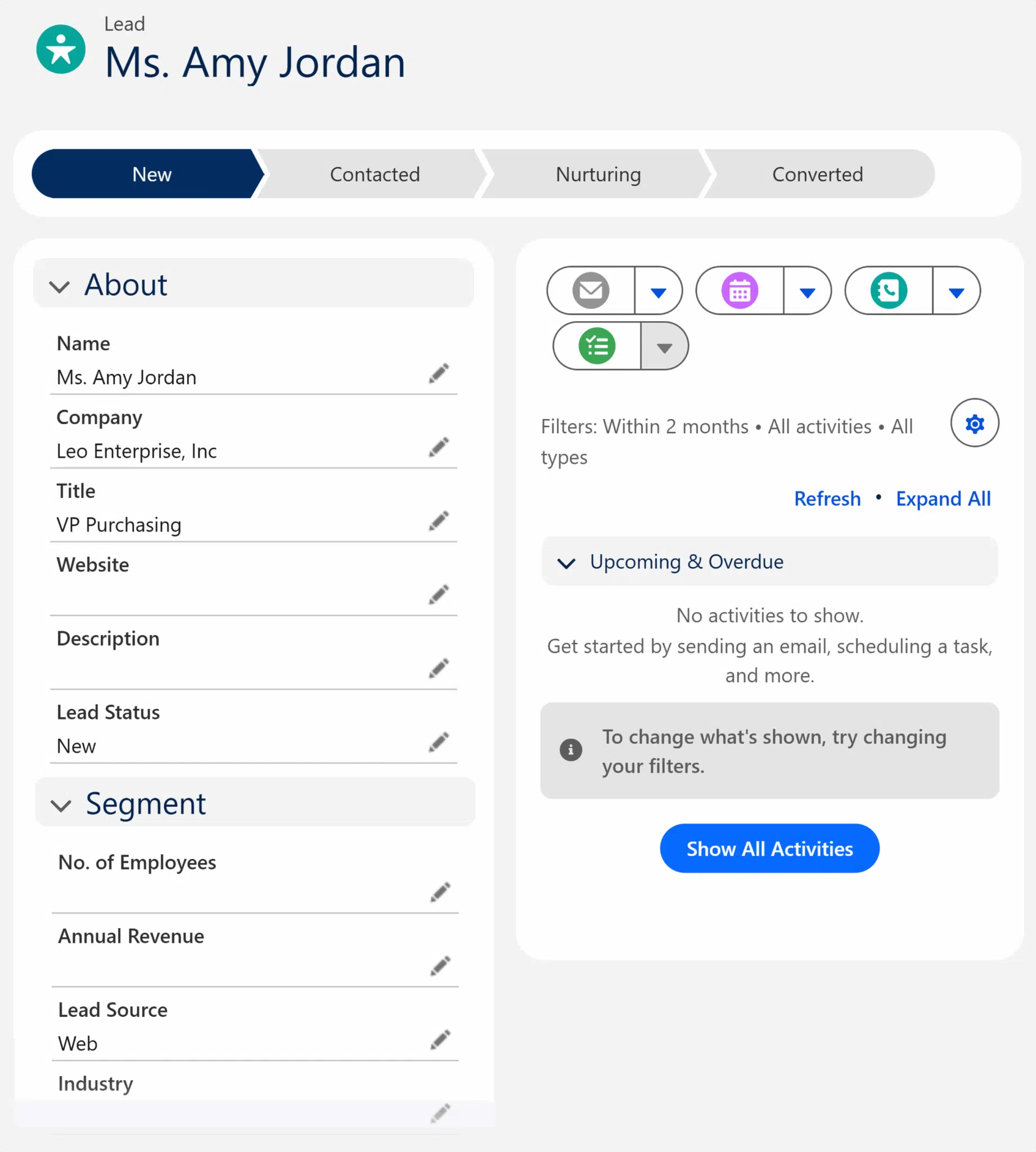
Typical Lead fields
Lead fields are the first checkpoints where Marketing and Sales can misalign. When that happens, attribution breaks before a Lead even enters the pipeline.
- Name and Company: Marketing captures this data about potential customers, and the sales team depends on it for outreach and account matching. If entries don’t follow agreed standards (“IBM” vs. “International Business Machines”), Salesforce creates duplicates. Engagement history splits, and only part of it flows into pipeline reports.
- Title: Marketing uses titles to qualify, Sales uses them to judge authority. If Marketing logs vague entries like “Operations,” Sales waste time on poor-fit contacts with zero-to-no level of interest. Attribution then shows Marketing-influenced deals that never progress.
- Email and Phone: Marketing collects them for nurturing and Sales for direct outreach. Fake or missing values create Leads Sales can’t contact. Campaign activity tied to those records never appears in reports, making Marketing look ineffective.
- Lead Source: Marketing uses it for channel attribution, Sales for ROI (return on investment) and pipeline forecasts. If Marketing logs “Webinar” while Sales records “Event,” reports split the same program into multiple channels. Opportunities show conflicting ROI, and Marketing’s contribution disappears.
When both teams define and use these fields the same way, Leads flow cleanly into Opportunities, attribution holds, and reports stay credible.

Lead status stages
Lead statuses show where a Lead is in the pre-sales journey, at the stage of the sales process just before it enters the pipeline. They only work if Marketing and Sales define them the same way and keep them updated.
- Open (Sales-owned): A Lead has been created but not yet contacted. Example: a demo request that waits in Salesforce until an SDR follows up. Timely updates show whether campaigns drive qualified demand or just names. If Leads stay here too long, Marketing results look weaker than they are.
- Working (Sales-owned): An SDR is actively engaging the Lead by calling or emailing. Updates reveal whether slow conversions stem from campaign quality or delayed follow-up. Without them, funnel reports give a distorted picture.
- Nurturing (Marketing-owned): A Lead isn’t ready for Sales and stays with Marketing until engagement builds (e.g., a webinar attendee who downloads a whitepaper but hasn’t discussed pricing). This status helps Marketing track long-term programs. Too many Leads here may signal weak targeting; too few may mean Sales are rejecting Leads too early.
- Converted (Sales-owned): A Lead is qualified and becomes a Contact tied to an Account, and sometimes an Opportunity when revenue potential exists. Updates here prove how many Leads move into the pipeline. If Sales skips this update, attribution breaks, and Marketing’s influence disappears from revenue reporting.
Note: Leads don’t always follow a straight path—they may jump from Open to Converted or loop back into Nurturing. What matters is that both teams follow the same rules and keep statuses current as they use Salesforce.
What about MQLs and SQLs?
Statuses show where a Lead is, but not whether it’s ready to advance. That’s where marketing-qualified leads (MQLs) and sales-qualified leads (SQLs) come in. The lead qualification process will look a bit different across the two teams.
MQL (Marketing-owned): A Lead that meets Marketing’s criteria for fit and engagement, often based on lead scoring or campaign activity. Example: A healthcare prospect attends a webinar and downloads a pricing guide. Marketing flags the Lead as an MQL, and it moves from Nurturing to Working.
SQL (Sales-owned): A Lead that Sales accepts as worth pursuing, usually after confirming details like budget or timeline. Example: The same healthcare prospect speaks with an SDR, who confirms budget and timeline. Sales accepts the Lead as an SQL and converts it to a Contact and Opportunity.
When MQL and SQL definitions are clear and applied consistently, Leads progress on time, campaign influence carries into Opportunities, and executives can trust the numbers. Misalignment leads to stalled Leads, inconsistent conversions, and attribution gaps that weaken both funnel and forecast.
Tip: Trend MQL→SQL by channel to spot which sources drive quality, not just volume.
Ownership, alignment, and misalignment
For MQLs and SQLs to be effective, ownership must be explicit:
- Marketing owns MQLs (flagging fit and engagement).
- Sales owns SQLs (confirming budget and intent).
- RevOps enforces conversion (upholding rules and field mapping).
When each team follows these rules, Leads flow cleanly. Example: Marketing flags a webinar attendee as an MQL. Sales qualifies it as an SQL and converts it into a Contact, Account, and possibly an Opportunity. This keeps Marketing influence visible in pipeline reports.
When ownership is unclear or definitions differ, Leads pile up, conversions stall, and attribution gaps undermine both funnel and forecast.
Your Attribution Model is Missing 40% of Brand Discovery
✓ Track brand mentions across all AI search platforms in real-time
✓ Connect AI-driven discovery to your existing analytics
✓ Measure sentiment and accuracy of every AI mention
Enterprise-grade AI tracking. Finally.
Recommended Articles


What is an Opportunity in Salesforce?
An Opportunity in Salesforce represents a qualified deal with revenue potential tracked in the pipeline. Every Opportunity is tied to an Account, anchoring the deal to a company record instead of leaving it floating on its own.
Opportunities can also be tied to one or more Contacts through Contact Roles. Salesforce doesn’t enforce these by default. But without Contacts, you risk creating “orphaned” Opportunities—deals that close without attribution.
Typical Opportunity fields
Opportunity fields connect potential deals to forecast data and campaign influence. For sales, they define how to work and close a deal. For Marketing, they determine whether attribution flows into the pipeline.
Each field plays a role in keeping reports accurate (and enhancing sales forecasting):
- Account: Every Opportunity must be tied to an Account. For Sales, this establishes ownership and territory alignment. For Marketing, it ties campaign history to the right company. If the wrong Account is chosen, duplicates form, reports conflict, and attribution tied to the real Account is lost.
- Stage: Tracks where the deal sits in the pipeline (Qualification, Proposal/Quote, Negotiation, Closed Won/Lost). For Sales, stages guide next steps and pipeline reviews. For Marketing, they show whether campaign-sourced deals advance. If stages are skipped or misapplied, forecasts break and Marketing loses visibility into conversion patterns.
- Amount and Close Date: Define the value and timing of potential revenue. Sales uses them to prioritize deals, and leadership relies on them for forecasts. For Marketing, they confirm whether campaigns generate high-value pipeline. If inflated or left as placeholders, forecast accuracy collapses and Marketing’s contribution looks overstated or irrelevant.
- Primary Campaign Source: Links the Opportunity to the most recent marketing campaign associated with the Lead or Contact. For Sales, it clarifies the source of pipeline. For Marketing, it powers Salesforce’s Campaign Influence model. If skipped or overwritten, Opportunities look Sales-sourced and campaign influence disappears.
- Contact Roles: Link the real buying stakeholders to the Opportunity. For Sales, they identify decision-makers and influencers. For Marketing, they prove multi-touch influence. If skipped, Opportunities appear orphaned—Sales can’t see the buying group, and Marketing loses attribution across the deal.
Together, these fields form the shared system of record. Used consistently, they connect campaigns to pipeline and give leadership forecasts they can trust.
Tip: Compare influenced pipeline by persona to see if campaigns reach real decision-makers, not just influencers.
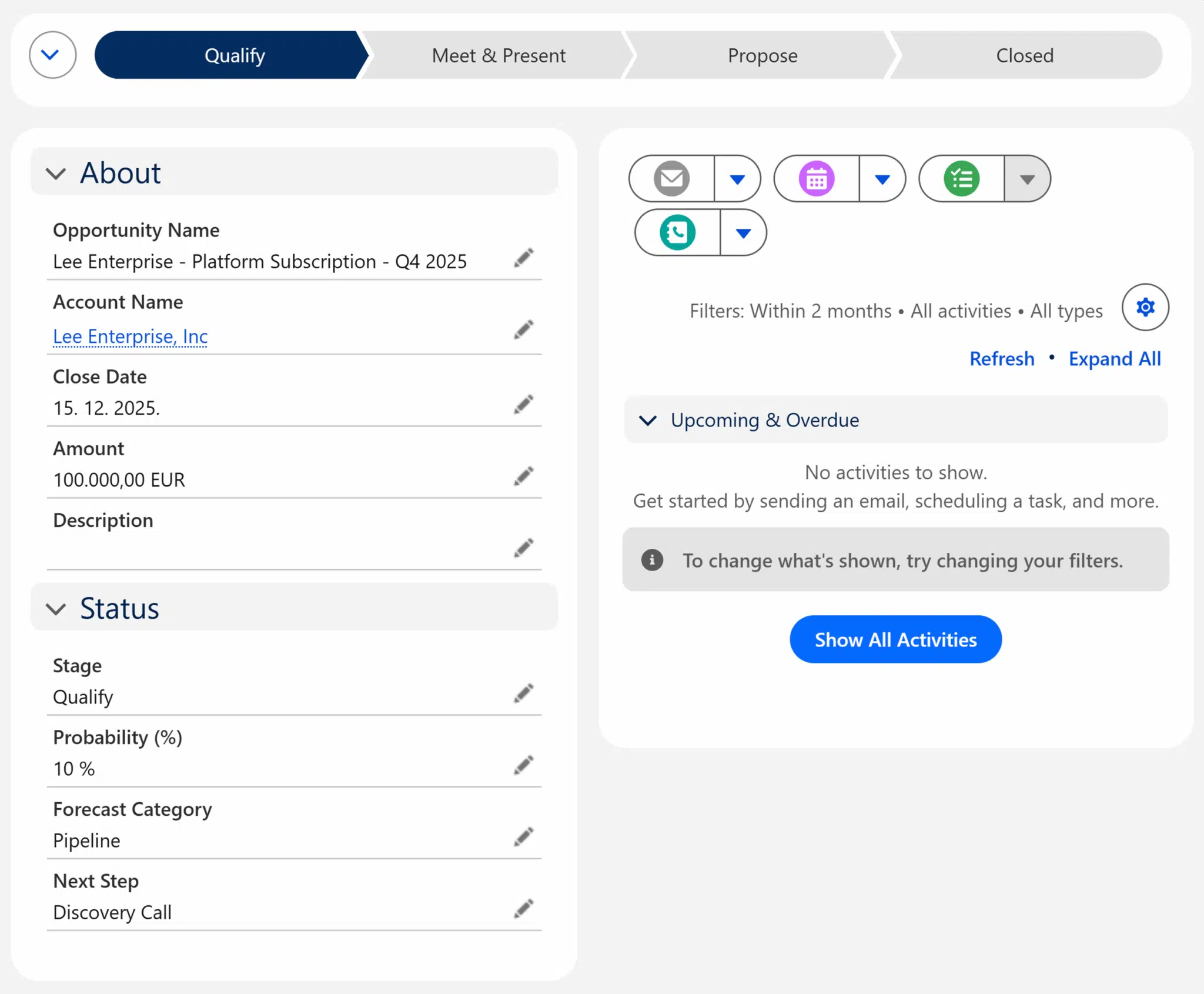
Typical Opportunity stages
Salesforce uses Opportunity stages to track how a deal progresses through the sales cycle. The exact stages vary by company, but most pipelines follow a familiar pattern:
- Qualification: An SDR
- Proposal/Quote: An AE (account executive) drafts a proposal and sends pricing. Marketing creates a case study and an ROI calculator to support the deal.
- Negotiation: The buyer raises objections about pricing. Sales addresses terms, while Marketing provides competitive content to support the conversation.
- Closed Won/Lost: The buyer decides. Signed contract = Closed Won; competitor win or delayed project = Closed Lost.
Stages drive forecasts and reveal whether campaigns are moving deals forward. When definitions are consistent, the pipeline tells a clear story. When they aren’t, forecasts swing and marketing loses visibility.
Why Opportunities matter
Opportunities are where campaigns meet revenue. They connect buyer activity to pipeline, drive forecast accuracy, and serve as a single source of truth for Marketing and Sales.
- Attribution: Opportunities inherit credit from the Primary Campaign Source field and the Contact Roles linked to them. Skip those links, and pipeline reports default to showing the deal as sales-sourced, erasing Marketing’s contribution.
- Forecasting: Depends on Stage, Amount, and Close Date. Wrong inputs mislead leaders and weaken
- Alignment: Alignment depends on shared rules for creating and updating Opportunities.
When a webinar attendee becomes an Opportunity with both a Campaign and a Contact Role attached, reports reflect the whole story—Marketing influence is visible, and Sales activity is credited accurately. But if an AE opens an Opportunity manually without those links, the deal appears Sales-sourced.
When Sales, Marketing, and RevOps enforce rules for Contact Roles, Primary Campaign Source, and stage definitions, Marketing influence carries through, pipeline stays accurate, and executives trust the forecast.
Leads vs. Opportunities: Key differences
This table highlights the core differences Salesforce makes between Leads and Opportunities. Use it to confirm if it agrees on ownership, reporting, and the value of each record type.
| Attribute | Lead | Opportunity |
| Definition | An unqualified prospect, not yet tied to revenue | A qualified deal with revenue potential |
| Typical fields | Name, Email, Company, Lead Source, Status | Amount, Close Date, Stage, Account, Contact Roles, Primary Campaign Source |
| Ownership | Typically, Marketing or SDRs | Usually, sales reps or AEs |
| Reporting value | Funnel volume, MQL→SQL conversion rates | Pipeline value, forecast accuracy, campaign attribution |
Note: “Primary Campaign Source” exists only on Opportunities. It links deals to campaigns for attribution. Lead Source, by contrast, tracks the original channel of entry.
Why the differences matter
Leads are the system’s entry point. They capture interest but aren’t yet tied to revenue. Opportunities sit downstream, tracking potential deals. The handoff between the two is where visibility is often lost.
Risks at the handoff include:
- Visibility loss: If Opportunities are created manually instead of converted, funnel activity is skipped, and Marketing’s role disappears.
- Attribution gaps: Without Campaigns and Contact Roles attached during conversion, pipeline reports default to sales-sourced only.
- Inconsistent process: Outbound reps may open Opportunities directly, which speeds things up but breaks funnel tracking.
Shared rules for conversion are necessary to keep attribution intact and reports trustworthy.
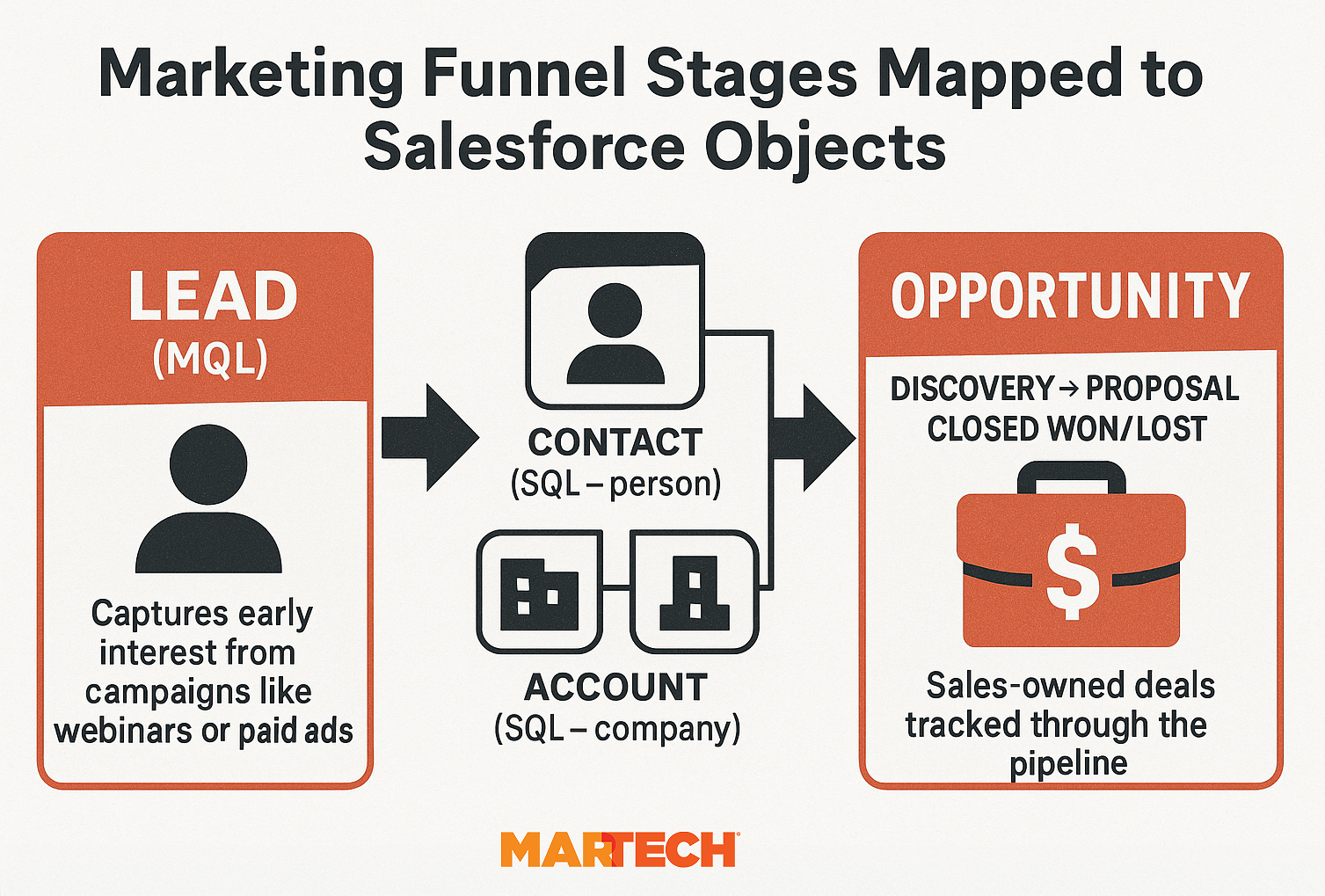
Mapping Salesforce objects to your funnel
To manage this handoff between Leads and Opportunities, it helps to understand how Salesforce objects map to funnel stages:
- Lead → Represents an early prospect at the top of the funnel.
- Conversion → a) Creates a Contact (the person), b) links them to an Account (the company), and c) opens an Opportunity if revenue is possible.
- Opportunity → Tracks the deal from pipeline through to close.

What happens when you convert a Lead in Salesforce?
When a Lead converts, Salesforce creates a Contact, links it to an Account, and can also create an Opportunity. How smoothly this handoff goes determines whether campaign engagement flows into pipeline reports or drops out of view.
Consistent conversion preserves attribution and pipeline accuracy. Inconsistent conversion creates duplicates, unattributed deals, and dire forecasts.
Guardrails for clean conversion
Before converting, confirm these three things are in place:
- Field mapping: Lead Source, UTM codes, and personas must transfer into the new Contact and Opportunity. Without mapping, campaign credit disappears.
- Contact Roles: Every Opportunity should include the buyer as a Contact with a defined role. If skipped, the deal appears as sales-sourced, and marketing influence is lost.
- Account linkage: New Contacts must connect to an Account. Bypassing this step creates duplicates and fragments data, leading to inaccurate reporting.
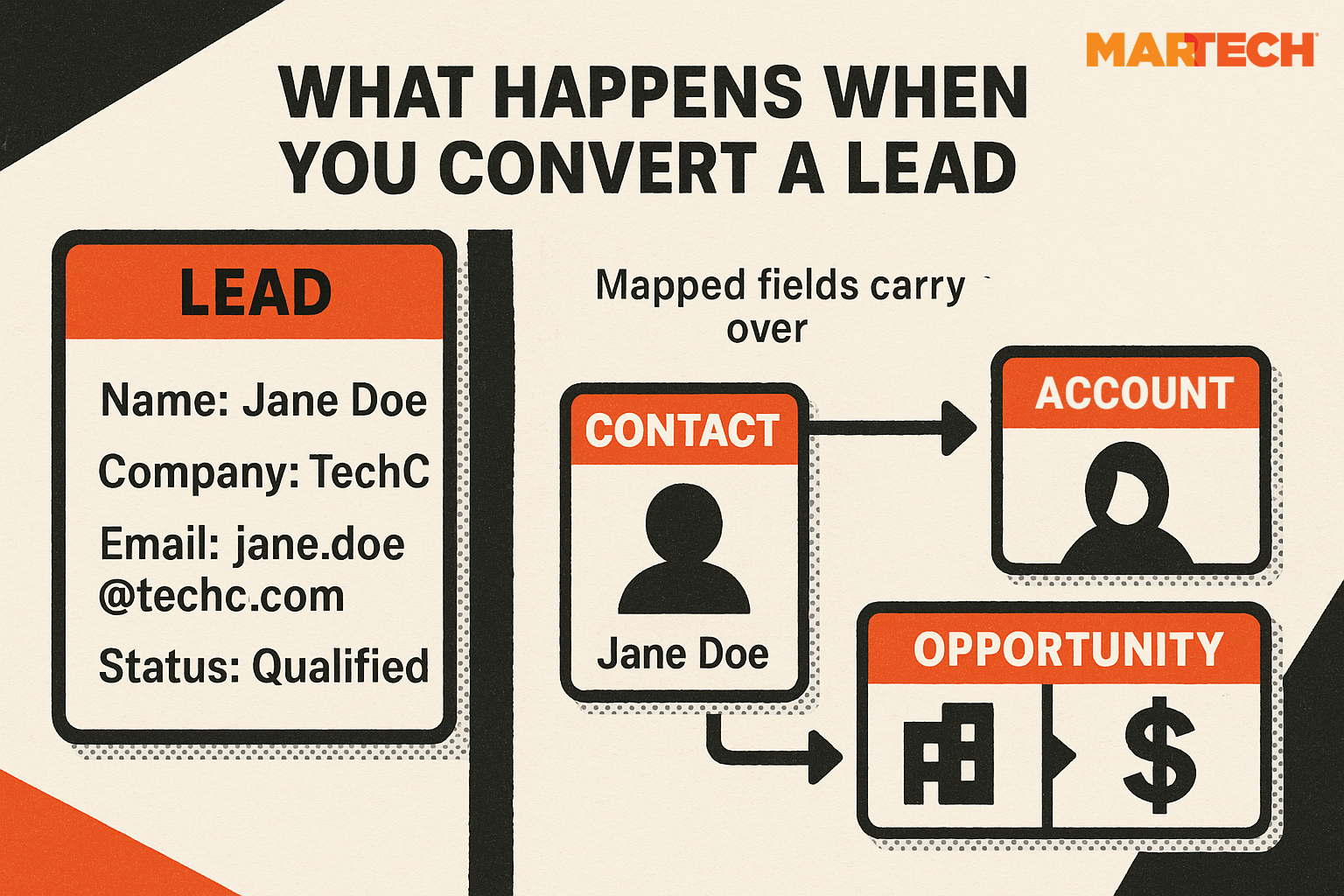
This diagram contrasts the two outcomes: a consistent conversion that ties campaigns to pipeline versus an inconsistent one that drops data and damages reporting.
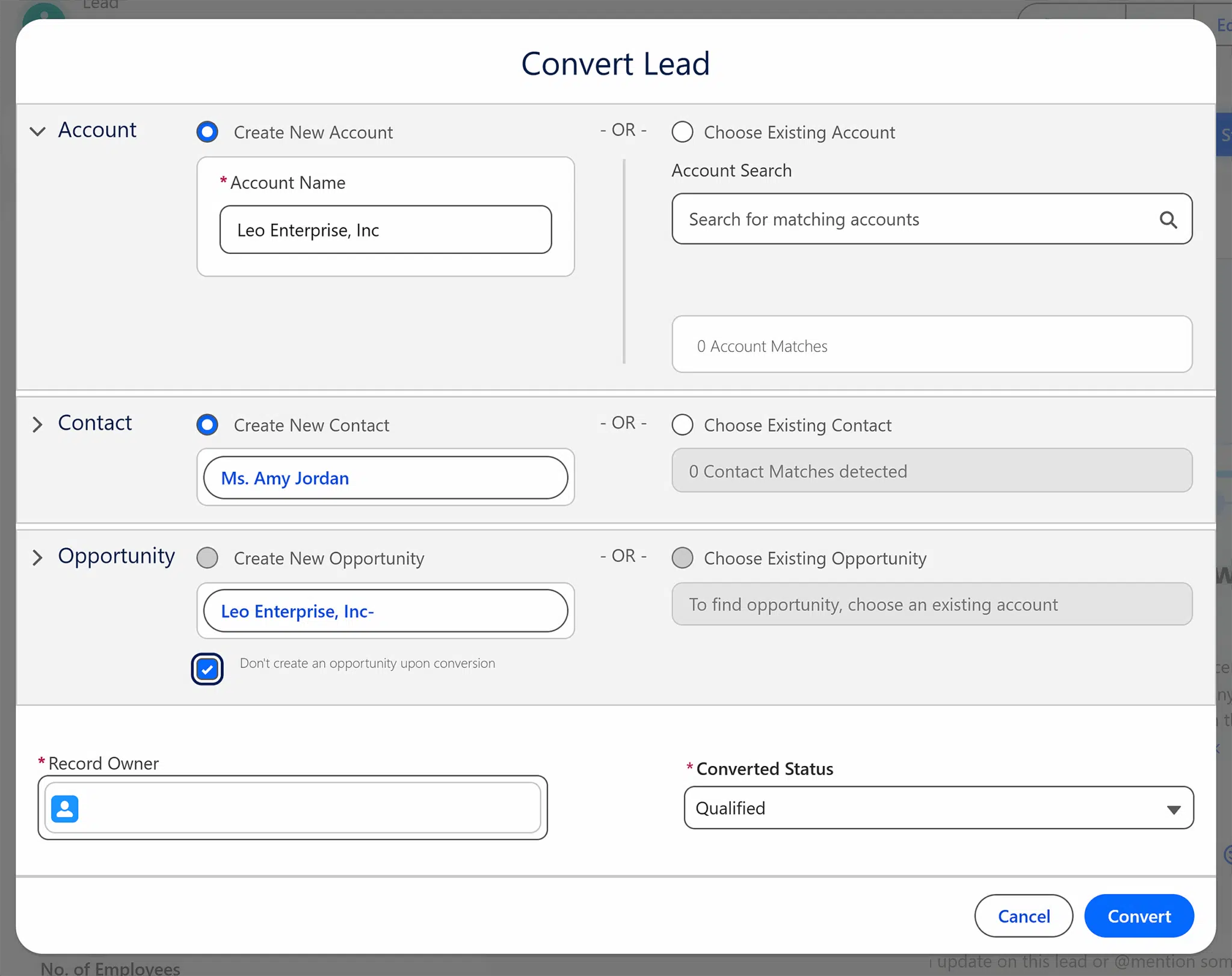
Conversion is where the funnel meets the pipeline, and it’s also where ownership shifts: Marketing validates engagement, Sales validates intent, and RevOps enforces the rules. Without alignment, Leads linger in limbo, Opportunities are created inconsistently, and executives lose faith in the numbers.

Pitfalls to avoid
Conversion breaks down when critical steps are overlooked. Here are the common pitfalls to look out for and what you can do about them.
| Pitfall | Fix |
| Lead Source doesn’t map to new records. | Run quarterly audits and update field mapping to ensure attribution flows into Opportunities. |
| Contact Roles aren’t added to Opportunities. | Make Contact Roles a required step in the conversion process; train reps to assign key stakeholders. |
| Teams dispute the timing of conversion. | Document shared conversion rules and review them in joint sales and marketing meetings. |
Field mapping
Because mapping happens behind the scenes, marketers should confirm that fields carry into new records. At a minimum, the Lead Source and Persona fields should carry over to Opportunities.

Run a quick test: create a dummy Lead with Source = Webinar and Persona = Decision Maker. Convert it, then check the new Opportunity. If the values didn’t carry over, work with RevOps or your Salesforce admin to fix the mapping before your next campaign.
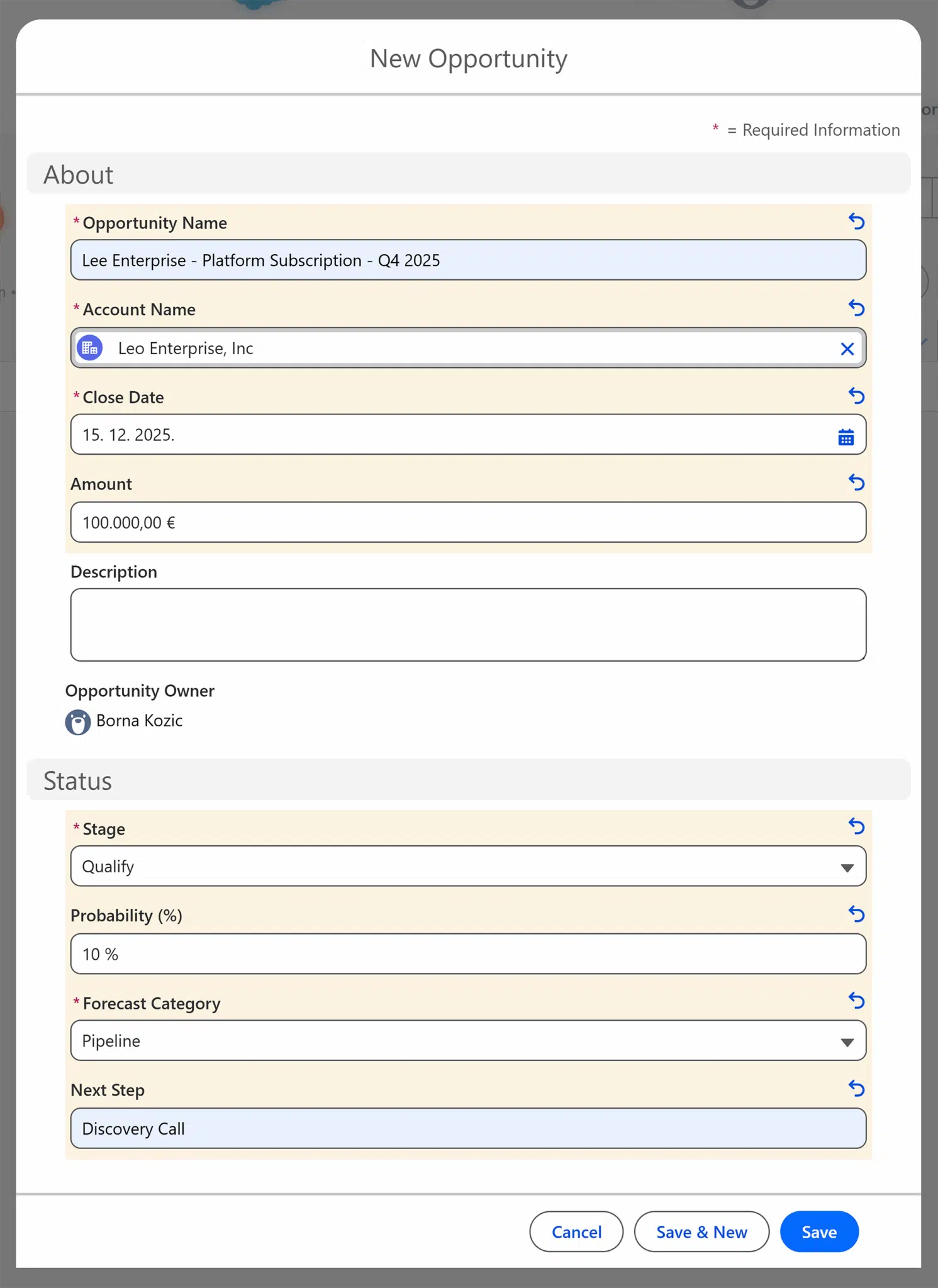
Creating the Opportunity and Contact Role
When a conversion creates an Opportunity, you should set key fields, such as Stage, Amount, Close Date, and Primary Campaign Source. Just as importantly, you must link the buyer through a Contact Role. Skipping either step erases Marketing influence and weakens forecast reliability.
The bigger picture
Conversion is where attribution succeeds or fails—and where the Marketing–Sales partnership is tested the most.
Once you create Opportunities and link them to real buyers, you can add fields such as Persona to help teams see which buyer types drive the most revenue. Teams can then refine targeting based on data that flows all the way from campaign engagement to closed deals.
When to convert a Lead into an Opportunity
Conversion timing directly affects attribution and forecast reliability. If Marketing and Sales agree on the trigger, campaign data carries forward, pipeline reports stay accurate, and executives can trust the numbers.
Signals it’s time to convert
Look for these signs that interest has become intent and revenue potential is worth tracking:
- Qualified interest: A prospect who fits your ICP attends a webinar and downloads a pricing guide. The repeated engagement signals the Lead is ready for sales.
- Meeting booked: An SDR schedules a discovery call or demo, confirming sales has accepted the Lead.
- Budget or timeline shared: The buyer confirms resources and timing, giving Sales the details needed to log accurate forecast data.
In most organizations, these triggers mark the MQL-to-SQL transition—when a marketing-qualified Lead becomes sales-qualified and is converted to a Contact and Opportunity.
Signals it’s not time yet
Hold off if the Lead shows curiosity but not intent to buy:
- A webinar attendee downloads slides but hasn’t engaged again.
- A prospect clicks an ad once but never returns.
Leads in this category should remain in Nurturing. Converting them prematurely distorts pipeline reports and weakens trust in attribution.

How to make timing a shared rule
Agreeing on conversion triggers is the key to clean, consistent handoffs from Marketing to Sales. With a shared SQL definition, Leads convert at the right time, the pipeline stays accurate, and Marketing influence remains visible in reports that executives can trust.
Consistent conversion rules protect attribution and forecast accuracy.
Do you need to use Leads in Salesforce at all?
Not technically. Salesforce can run on Contacts and Accounts alone. But for most B2B marketers, using Leads is the cleaner, safer choice. Leads preserve funnel reporting, protect campaign attribution, and make the handoff from MQLs to SQLs visible.
There are two main workflows in Salesforce: a Lead-based workflow or a Contact/Account-based workflow. Which one you choose affects how you measure the funnel, how you hand off prospects, and how visible Marketing’s influence is in pipeline reporting.
Lead-based workflow (inbound motion)
In this model, every new name—from a demo request, event signup, or paid ad—enters Salesforce as a Lead. SDRs then qualify the Lead.
When they click Convert, Salesforce creates a Contact, links it to an Account, and can also create an Opportunity. Campaign attribution is preserved when the buyer connects as a Contact Role.
This structure gives marketers and sales leaders clear funnel metrics:
- How many MQLs become SQLs
- How many SQLs convert into Opportunities
- How much Marketing influences the pipeline
Consider a mid-market SaaS buyer who requests a demo after clicking a paid search ad. Salesforce logs their details in the Lead record. Once an SDR qualifies and converts the Lead, the buyer becomes a Contact tied to an Account, and a new Opportunity is created if revenue potential exists. Since the Lead Source and Contact Role fields carry over, Marketing’s influence remains visible in pipeline reports.
The benefit of this model is reliable funnel reporting and clear visibility into Marketing’s influence. The risk comes when Leads are left unconverted: they never appear in the pipeline, Marketing’s impact is invisible, and teams dispute what worked.
Contact and Account-based workflow (best for ABM/outbound motion)
Some enterprise teams bypass Leads when running outbound or account-based marketing (ABM). Instead, they use a process like this to build pipeline directly from Accounts and Contacts:
- Start with an Account: Create the Account record first, since the company is already known.
- Add multiple Contacts: Log decision-makers such as a Head of Ops, Finance Director, or IT Manager.
- Create an Opportunity when the group engages: Open the deal once the buying team shows interest.
This model fits ABM and outbound best. Since Sales and Marketing already know which accounts to pursue, the process can start directly with Accounts and Contacts instead of routing new Leads through qualification.
Lead-based vs. Account/Contact-based workflows
Choosing between Lead-based and Contact/Account-based workflows depends on your go-to-market model. Each option has strengths and weaknesses that shape how clearly you see the funnel, how well handoffs work, and how much trust executives place in reports.
| Factor | Lead-based workflow | Account/Contact-based workflow |
| Funnel visibility | Clear path: Lead → MQL → SQL → Opportunity makes Marketing influence visible | Weaker early visibility: no MQL → SQL path |
| Attribution impact | Campaign influence is easier to track through conversion | Campaign touchpoints may not carry through to pipeline reports |
| SDR efficiency | Inbound names can be queued and qualified quickly | Outbound focus means fewer inbound names to process |
| Handoff quality | Creates a defined checkpoint where Marketing and Sales align | Direct Account/Contact entry avoids the conversion step |
| Duplicates/ admin load | Risk of duplicate records; SDRs must manage conversions | Fewer duplicates; fewer steps once Accounts are pre-targeted |
| Fit for the GTM model | Favored in inbound SaaS models | Favored in enterprise ABM and outbound campaigns |
Taken together, these tradeoffs explain why Leads are favored in inbound SaaS models, while Accounts and Contacts are more common in enterprise ABM. Each approach has a logic—but consistency matters more than which model you choose.
How to choose
Which workflow fits your business depends on where demand starts and how your teams are organized.
- Inbound-heavy SaaS: Leads are almost always the better choice for marketers. They provide funnel clarity, preserve attribution, and make Marketing’s influence visible to the C-suite.
- Enterprise ABM: Accounts and Contacts work better for managing multi-person buying groups, but this choice sacrifices visibility into early-stage influence.
- Hybrid orgs: Some use both. If you do, set strict rules for when each model applies and enforce them consistently.
Regardless of which model you choose, the key to making it work is clear ownership.
In a Lead-based workflow, Marketing owns inbound Lead capture because it starts with campaign-driven demand. In an Account/Contact model, Marketing still owns the creation of inbound records, but those names are logged directly as Contacts tied to Accounts.
Sales owns outbound creation in both models, since those records come from rep-driven outreach. RevOps enforces the rules so both teams follow the same process. Without this structure, records are created inconsistently, attribution breaks down, and executives lose confidence in reports.
Why data hygiene matters
In Salesforce, data hygiene is the foundation of credible reporting, accurate forecasts, and trusted attribution.
How poor data strains the Marketing–Sales partnership
Sales and Marketing already approach the funnel from different angles.:
- Sales wants speed: Reps need a steady flow of Leads in queue to hit their quota.
- Marketing demands precision: Fields must be accurate and complete to segment audiences and prove ROI.
When records are incomplete or inconsistent, those natural differences turn into friction. Sales wastes time chasing poor-fit names. Marketing can’t prove which campaigns worked.
The ripple effects of bad data
When hygiene breaks down, the impact spreads across the business:
- Reporting and forecasting. Dashboards overstate or understate pipeline. Leadership makes decisions based on shaky numbers, which can lead to budget and resource allocation issues.
- Duplicate records. Two SDRs may call the same buyer with different pitches, creating a poor experience and wasting time.
- Attribution gaps. If Lead Source or Primary Campaign Source values are missing or inconsistent, campaign ROI disappears. Marketing looks ineffective, even when it creates demand.
- Compliance risks. Missing consent or opt-in fields can expose the business to GDPR or CCPA fines.
- Weak personalization. Without consistent job titles or industry tags, Marketing can’t distinguish decision-makers from influencers. Campaigns end up generic, lowering engagement and conversion. Worse, Sales may follow up with the wrong message (like pitching enterprise pricing to an intern), which erodes credibility with the buyer.
Signs hygiene is slipping
Marketers don’t need admin access to spot problems. A few checks reveal whether data is drifting off track:
- Run dashboards side by side and ask yourself, do totals align?
- Search for duplicate Leads or Contacts by email.
- Scan Opportunities for missing Primary Campaign Source.
- Look at compliance fields like opt-in. Are they consistently filled?
If these checks fail, attribution is already slipping, and pipeline trust is at risk.
Most hygiene problems start at the Lead-to-Opportunity handoff. If Lead Source isn’t standardized, fields don’t map, or Contact Roles aren’t required, campaign data disappears, and deals look sales-sourced.
Safeguards marketers should push for
These safeguards are like insurance that protects your attribution:
| Safeguard | What it does | Why it matters |
| Duplicate and matching rules | Catch duplicates at record creation or import | Prevents two reps from chasing the same prospect, which wastes time and undermines trust in Marketing-sourced names |
| Validation rules | Require key fields like Lead Source or Contact Role | Ensures Opportunities can’t be saved without campaign attribution, keeping Marketing influence visible |
| Flows | Automate campaign association and record routing | Helps preserve campaign credit by reducing reliance on reps to update fields |
| Picklist governance | Standardize values such as Lead Source or Stage | Stops reporting from fragmenting into “Webinar” vs “Event” vs “Web” |
| Scheduled audits | Review aged Leads and test field mappings | Confirms that attribution fields still map correctly from Leads into Opportunities |
What good hygiene makes possible
Clean data doesn’t just prevent problems. It enables Sales and Marketing to operate as one system.
With duplicate rules in place, SDRs know they’re working fresh names, not calling the same buyer twice. With standardized Lead Source values, Marketing can prove that last quarter’s webinars generated real Opportunities instead of fighting over fragmented reports.
The payoff: Clean data produces trusted reports and strengthens marketing–sales alignment.
How to customize Lead and Opportunity workflows
Customizing Lead and Opportunity workflows keeps Marketing influence visible and enforces consistency. Without these adjustments, attribution can disappear and handoffs become messy.
Persona mapping
Adding persona fields to Leads, Contacts, and Opportunities lets you tag buyers by role (decision-maker, influencer, end user).
Without this visibility, you’ll know who entered the funnel but not whether revenue came from people who could actually sign off. That leaves Marketing in the dark about whether campaigns are reaching the right audience.

Primary Campaign Source (with validation)
Primary Campaign Source links an Opportunity back to the campaign most responsible for sourcing it. But unless it’s enforced, sales reps may skip the field. The result? “Mystery Opportunities” that show up as Sales-sourced, erasing Marketing’s influence.
A validation rule fixes this by blocking reps from saving an Opportunity without a campaign source. Without validation, a deal logged without Primary Campaign Source looks Sales-owned. With validation rules in place, attribution stays intact and reports are accurate.
Flows to enforce Contact Roles and campaign association
Flows are Salesforce automations that require specific fields or associations before a record can move forward.
For example, a Flow can block an Opportunity from saving unless at least one Contact Role is linked. Without it, you risk “orphaned Opportunities” that aren’t tied to buyers.
Flows can also auto-associate campaigns. A Flow can auto-associate webinar Leads to resulting Opportunities, preserving visibility that would be lost if reps had to add campaigns manually.
These customizations enforce shared rules that protect attribution, reduce disputes, and strengthen the marketing–sales partnership.
How to report on Leads and Opportunities separately (and together)
Funnel and pipeline reports must connect for Marketing’s influence to show up in revenue. Here’s how each type of reporting works—and how to make it actionable.
Funnel reports
Funnel reports show how campaigns generate and qualify demand before sales is involved. For marketers, this makes influence at the top of the funnel visible. For example, a content syndication program may generate 300 Leads but only 60 that meet MQL criteria. Reporting on MQL → SQL conversion rate, cost per qualified Lead, and Lead velocity proves whether spend delivers quality, not just volume.
Pipeline reporting
Pipeline reports track how Opportunities progress once they’re created. For Sales, they reveal where deals stall. For Marketing, they prove whether campaign-sourced deals advance. If Opportunities from webinars stall in Proposal, Marketing can deliver late-stage content—ROI calculators, case studies, testimonials—to help move them forward.

Joined reports
Joined reports connect funnel and pipeline in one view. A joined report might show 300 Leads from a webinar, with 60 converting into $2.5M in Opportunities. This ties campaign activity directly to revenue impact.
Step-by-step recipe (Salesforce Lightning):
- Go to “Reports.”
- Click “New report.”
- Choose “Joined report.”
- Add “Leads” as Block 1.
- Add “Opportunities” as Block 2.
- Add shared fields to both (e.g., “Campaign”, “Lead Source”).
- Click “Run.”
Use the result: Filter by campaign to compare Leads → Opps → Closed Won for a single program and export a one-slide view for leadership.
Common reporting pitfalls (and how to fix them)
Reporting gaps erode trust and make Marketing’s impact disappear. These are the most frequent problems—and how to prevent them:
- Duplicate Leads: Inflate volume and distort ROI.
Fix: Configure duplicate rules to block or merge duplicates before they enter the funnel. - Opportunities without Contact Roles: Can’t be tied back to campaigns, leaving Marketing invisible in reports.
Fix: Require at least one Contact Role before saving an Opportunity. - Broken field mapping: Causes Lead Source to drop during conversion, making Opportunities appear Sales-sourced even when Marketing drives engagement.
Fix: Audit Lead-to-Opportunity field mapping quarterly to confirm attribution fields carry over.
Campaign Influence
By default, Salesforce attribution runs through Primary Campaign Source—a single campaign linked to the Opportunity. This credits only one touch, often the last before creation.
To show multi-touch influence, enable Campaign Influence. It links Opportunities to Campaigns through shared Contacts. Example: A buyer downloads an ebook, attends a webinar, and joins a field event before a $1M Opportunity is created. Without Campaign Influence, only one campaign is credited. With it, all three are recognized—Marketing’s role is visible.

Reports marketers need
Ask Sales Ops or RevOps for dashboards that:
- Connect Leads to Opportunities and closed deals.
- Include both Primary Campaign Source and Campaign Influence views.
- Are reviewed jointly with Sales for a shared source of truth.
When funnel and pipeline reports connect, Marketing’s influence stays visible, Sales trusts the data, and executives gain forecasts they can rely on.
Next steps to protect attribution in Salesforce
Take these three steps now to safeguard attribution in Salesforce—so Marketing’s influence stays visible, Sales and Marketing work from the same data, and leadership sees a reliable pipeline that turns into paying customers.
- Run a conversion audit: Check whether Leads carry campaign data into Opportunities. If not, attribution is already broken.
- Meet with sales: Agree on what qualifies as a Lead, Sales Qualified Lead (SQL), and Opportunity so every report tells the same story.
- Request a joined report (or dashboard): Link Leads → Opportunities → Closed Won so executives can see the full flow from campaign to revenue.
Together, these steps protect attribution, make Marketing’s role in revenue clear, and build the kind of alignment that earns budget, credibility, and growth opportunities.